You are using an out of date browser. It may not display this or other websites correctly.
You should upgrade or use an alternative browser.
You should upgrade or use an alternative browser.

Paltalk Chatter Bot 5.6
No permission to download
- Author RedAdmin
- Creation date
Pal Chatter Bot v5.6 — Major Update
Created by SLY Software • palstalk.com
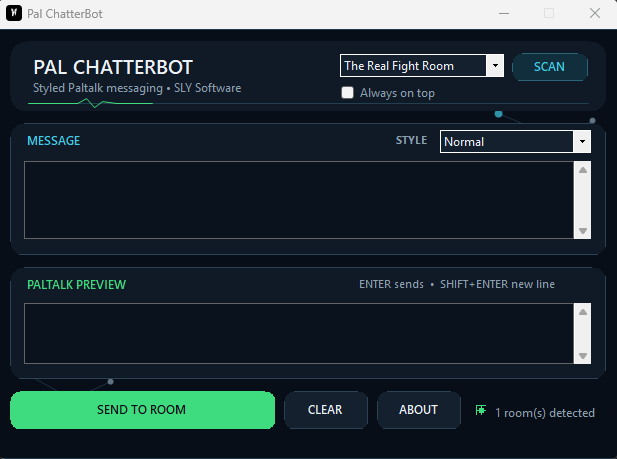
Pal Chatter Bot has received a major update focused on speed, reliability, cleaner Paltalk integration, easier font selection, and improved background startup behavior.
The program is still the same lightweight tool you know: type your message, choose a style, and send your customized text directly to your selected Paltalk room. But a lot has changed behind the scenes.
What’s New in v5.6?
Favorite Your Font Styles
Have a few styles you use all the time?
You can now click the ☆ star button beside the Style selector to save a font style as a favorite.
Your favorite styles are automatically moved toward the top of the list, making them much faster to find. Favorites are also remembered when you close and reopen the program.
Many More Font & Text Styles
The style library has been greatly expanded with more:
- Fancy text styles
- Decorative fonts
- Unusual but readable styles
- Bold and script styles
- Gothic and specialty styles
- Framed and accented text
- Fun Unicode-based designs
There are now many more ways to give your Paltalk messages their own look without making Pal Chatter Bot complicated to use.
Faster & Smarter Paltalk Sending
A lot of work went into improving how Pal Chatter Bot communicates with the Paltalk chat window.
The program can now prepare and cache the selected room's chat control ahead of time, allowing messages to be sent more quickly and smoothly.
If Paltalk recreates or changes the chat control, Pal Chatter Bot can automatically attempt to reconnect instead of simply giving up.
The result is a faster and more reliable sending system during normal Paltalk use.
New Health Indicator
Pal Chatter Bot now gives you a better indication of whether it's ready to communicate with your selected Paltalk room.
You may see states such as:
CONNECTING / RECONNECTING — Pal Chatter Bot is preparing or recovering its connection to the room.
ATTENTION NEEDED — Paltalk may not be detected yet or you may need to select a room.
This makes it much easier to know what's happening without guessing.
New Animated Pulse
The interface now includes a smooth animated green pulse inspired by the visual design used in Pal MicTimer Pro.
It's a subtle visual improvement that gives the compact interface a little more life without becoming distracting.
Completely Redesigned “START W/PT”
The START W/PT system has received one of the biggest changes in this release.
Previous versions used a different startup method. v5.6 now includes a purpose-built lightweight component called:
PaltalkCompanion.exe
You do not open this program yourself.
When START W/PT is enabled, Paltalk Companion quietly waits in the background for Paltalk.
The behavior is now:
Windows starts → Companion waits quietly → You open Paltalk → Pal Chatter Bot opens automatically.
Most importantly, the full Pal Chatter Bot window no longer needs to pop up simply because Windows started.
Paltalk Companion Stays Out of Your Way
Paltalk Companion has no normal user interface and is designed specifically as a lightweight supporting component.
Users still open and use only:
PaltalkChatSender.exe
The Companion simply handles the optional automatic Paltalk startup integration behind the scenes.
Closing Pal Chatter Bot manually now means closing Pal Chatter Bot.
Much Cleaner Shutdown Behavior
Click the X and the main program shuts down completely.
If Paltalk is still running, the Companion will not annoy you by immediately reopening Chatter Bot during that same Paltalk session.
Once Paltalk closes, the session resets. The next time you start Paltalk, Chatter Bot can automatically open again.
Pal Chatter Bot will also automatically shut itself down when Paltalk closes.
Cleaner, More AV-Friendly Architecture
The internal startup architecture has been redesigned to be cleaner and more transparent to Windows security software.
The old self-copying helper approach has been completely removed.
PaltalkCompanion.exe is now a real, separately built supporting component with its own identity and purpose.
The new v5.6 Release build has also been tested with our antivirus software during development and is currently operating normally without the behavioral detection encountered during development of the previous architecture.
As always, security software can change its detection rules at any time, so please report any false-positive detection to us.
Hidden Developer Diagnostics
For troubleshooting future Paltalk changes, Pal Chatter Bot also includes a hidden developer diagnostics panel.
Press:
CTRL + SHIFT + D
This provides technical information about room detection, cached chat controls, sending status, connection state, and errors.
Most users will never need it — but it gives us much better information if a future Paltalk update changes something.
Download the new ZIP and extract all files to a folder before running the program.
Updating to v5.6
Launch:
PaltalkChatSender.exe
You may also see:
PaltalkCompanion.exe
That file is an official part of Pal Chatter Bot v5.6. You do not need to manually open it.
Keep the supplied files together in the program folder so all features continue to work correctly.
Thank You for Testing Pal Chatter Bot
This update involved much more than changing the appearance of the program. A large portion of v5.6 was spent improving the underlying Paltalk communication, startup lifecycle, shutdown behavior, diagnostics, and overall reliability.
If you encounter a problem after a future Paltalk update, please report it so we can investigate.
Created by: SLY
SLY Software
palstalk.com
Pal Chatter Bot v5.6 — smaller, smarter, cleaner, and built specifically for Paltalk.
#
###
**Created by SLY Software | palstalk.com**
Pal Chatter Bot has received a major internal upgrade!
This version keeps the simple automated message system you already know, while adding a much smarter connection to the current Paltalk desktop client.
Create your messages, select your Paltalk room, choose your posting interval, and let **Pal Chatter Bot** automatically cycle through and post your messages.
---
##WHAT'S NEW IN v4.2.3?
###
A new optional **Start with Paltalk** setting has been added.
Enable it once and Pal Chatter Bot can automatically launch whenever you start Paltalk.
**Paltalk Starts → Chatter Bot Starts**
No need to manually launch the bot every time you use Paltalk.
Don't want this feature? Simply leave the option disabled.
---
###NEW — Automatically Closes With Paltalk
Pal Chatter Bot now knows when the actual Paltalk application has closed.
When Paltalk completely exits, Chatter Bot automatically performs its cleanup and closes too.
**Paltalk Closes → Chatter Bot Closes**
This means Chatter Bot isn't left unnecessarily running in the background after you're finished using Paltalk.
---
###NEW — Optimized Paltalk Message Sender
The message-sending engine has received a major upgrade.
Instead of relying solely on the older keyboard/clipboard method, Chatter Bot can now locate and communicate directly with the appropriate Paltalk chat composer.
Once the correct Paltalk chat control has been found, Chatter Bot can cache it for faster subsequent messages.
The result is:
Better targeting of the selected room
Less unnecessary searching
Reduced automation overhead
---
###
Reliability was a major focus of this update.
If the optimized sending method becomes unavailable, Chatter Bot retains its proven compatibility sending method as a fallback.
The bot can also discard stale Paltalk control information and attempt to locate the correct chat composer again.
Additional safeguards help prevent an uncertain send from being blindly repeated and potentially posting the same message twice.
---
###IMPROVED SINGLE-INSTANCE PROTECTION
When automatic Paltalk startup is enabled, safeguards prevent multiple copies of Pal Chatter Bot from piling up.
One Chatter Bot.
One Paltalk session.
Simple.
---
###ALWAYS ON TOP IMPROVEMENT
The **About Us** window has also been corrected for users who enable **Always On Top**.
The About window now properly stays above the main Chatter Bot window instead of becoming trapped behind it.
---
##
Create and maintain multiple messages
Choose your own posting interval
Select from your currently open Paltalk rooms
Scan and refresh available rooms
Test Chat before starting the bot
Lightweight, simple interface
---
##
Pal Chatter Bot does **not** require a traditional installer.
###Download the ZIP file
Download the latest **Pal Chatter Bot** ZIP package.
###Extract the ZIP
**Do not run the program directly from inside the ZIP file.**
Right-click the downloaded file and choose:
**Extract All...**
Choose where you would like to keep Pal Chatter Bot and click **Extract**.
###Run Pal Chatter Bot
Open the extracted folder and double-click:
**PaltalkChatSender.exe**
---
##
Scan for your open Paltalk rooms if necessary.
Select the correct room.
Add the messages you want the bot to post.
Choose your posting interval.
Use **Test Chat** to make sure everything is communicating correctly.
Press **START**.
Pal Chatter Bot will automatically cycle through your configured messages and post them at the interval you selected.
Press **STOP** whenever you want to stop automatic posting.
---
##OPTIONAL: START WITH PALTALK
Want Chatter Bot available automatically?
Enable:
**☑ Start with Paltalk**
Once enabled, the lightweight startup system waits for Paltalk.
When Paltalk starts, Chatter Bot starts.
When Paltalk closes, Chatter Bot closes.
Disable the option at any time if you prefer launching Chatter Bot manually.
---
##
Pal Chatter Bot is intended for legitimate room announcements, greetings, reminders, information, links, and other periodic messages.
Please use reasonable posting intervals.
Do not use Chatter Bot to flood, spam, harass, or intentionally disrupt Paltalk rooms.
Always respect the rules established by individual room owners and administrators.
---
##DISCLAIMER
Pal Chatter Bot is an independent third-party utility and is **not created, endorsed, sponsored, or supported by Paltalk**.
Paltalk and related names and trademarks belong to their respective owners.
---
###
**SLY Software**
**palstalk.com**
*Tools created for the Paltalk community.*


In this version I have redesigned the entire look and feel of the program.
I also recently discovered new paltalk window handle methods that are more reliable that the old method this v1 -3 used.
So i have also updated the paltalk window handler methods here to known current stable versions.
It should behave more reliably now and easily paste to the selected paltalk room you choose.